Showing posts with label free. Show all posts

Friday, August 11, 2017

les freebox, crystal boitier TV et son disque dur, comparaison avec Mini 4K Android TV

Boitier_TV-de_la_Freebox_Crystal avec le disque dur

Freebox est une première mondiale, elle est la première Box Triple Play, c'est-à-dire le premier terminal réseau offrant accès simultanément (en sept 2002):
  • à Internet, 
  • à la télévision (TNT et IP), 
  • au téléphone.
Il existe 3 types de freebox en circulation 2017:
  • V5 « HD » : 19 avril 2006
  • V6 « Révolution » : 14 décembre 2010
  • V5 « Crystal » : 11 juin 2013
  • V6 « Mini 4k » : 2015
  • V7 : prévue 2017-2018 (la post-révolution)?
Il y qq différences entre la V5 HD et la V5 crystal:
http://www.universfreebox.com/article/21520/Exclu-decouvrez-l-interieur-du-Boitier-TV-de-la-Freebox-Crystal
Le disque dur est un IDE-ATA de 80Go dont 40Go sont pour l'utilisateur.
On peut y mettre un IDE-PATA.
Il faut garder le 80Go (quand vous aller le rendre un jour...).

Pour le boitier "modem", voir l'intérieur:
http://www.universfreebox.com/article/21515/Exclu-decouvrez-l-interieur-de-la-Freebox-Crystal-1-modem

V5 « Crystal »: c'est de l'électronique/soft qui date de 2005 avec un nouveau boitier!!!
https://fr.wikipedia.org/wiki/Freebox

Abonnement

Réduction sur les abonnements mobile :
4 € sur le forfait à 19,99€/mois (4 max.)
ou 2€ de remise sur le forfait à 2€/mois (1 max.)

crystal

Abonnement  (29,99 €/mois)
+1.99€ pour la télé (services TV par IP)
ce service était compris dans les forfaits internet de Free depuis ses débuts, mais depuis le 1er février 2011 il est à ce prix,
(et le téléphone (5,99 €/mois) en zone non dégroupée).

Options:
+ 2,99 €/mois pour les appels vers les mobiles de France et DOM

On peut l'échanger contre la V6 mini 4k (coût: 50+19€).

Mini 4K

Freebox Mini 4K
29,99 €/mois pour la télévision, le téléphone et l'internet. Uniquement en zone dégroupée.
Options:
2,99 €/mois pour les appels vers les mobiles de France et DOM
4,99 €/mois pour un décodeur Freebox Mini 4K Player

Free a surpris son petit monde en proposant la première box multimédia 4K sous Android TV (5.1).
https://fr.wikipedia.org/wiki/Android_TV
il est nécessaire de rappeler que toutes les applications Android ne sont pas compatibles avec Android TV. Le catalogue est ainsi assez peu fourni et, qui plus est, bridé sur la Freebox Mini 4K !
Remplaçante de l'antique Freebox Crystal/HD, la Freebox Mini 4K est annoncée comme parée pour l'avenir avec
  • une compatibilité 4K/UHD, 
  • le support du marché d'application de Google et 
  • une télécommande à reconnaissance vocale. 
Plus qu'une simple box multimédia, Free assure qu'il s'agit également d'une plateforme douée pour la lecture en streaming et le jeu.
http://www.lesnumeriques.com/disque-dur-multimedia/free-freebox-mini-4k-p25237/test.html

L'encodage se ferait exclusivement en AVC et en Full HD, avec deux flux maximum.
 L'examen du circuit imprimé nous apprend que la mémoire est répartie sur 4 puces — 2 à l'avant, 2 à l'arrière – de 512 Mo pour un total de 2 Go. Enfin, la partie stockage est confiée à une puce Toshiba eMMC de 8 Go placée au dos du circuit imprimé. C'est peu, mais il est possible d'étendre cet espace de stockage via une clé USB ou une carte mémoire SD.
la Freebox Mini 4K est donc loin d'être un monstre de puissance si on compare son SoC à celui qui équipe les smartphones et tablettes milieu et haut de gamme. En revanche, le nouveau boîtier de Free se révèle plus costaud que ses prédécesseurs, Freebox Revolution Player comprise. En effet, le processeur Intel Atom CE4150 (1 cœur à 1,2 GHz) utilisé sur la box premium du FAI offre une puissance brute 5 fois inférieure à celle du processeur du SoC Broadcom BCM7252. La Freebox Crystal (ex-Freebox HD) est quant à elle dans un autre monde avec une puissance brute 23 fois inférieure.
Pour lire du contenu multimédia, il est possible de relier un périphérique USB sur l'un des trois ports. Deux sont situés à l'arrière tandis que le dernier est en façade. Tous sont de type USB 2.0 (le SoC est pourtant compatible USB 3.0) et donc limités à un débit pratique d'environ 30 Mo/s. Ce n'est pas forcément un problème puisque cela autorise tout de même un débit vidéo/audio de 240 Mb/s, soit bien plus que ce que proposeront les films Ultra HD des Blu-ray 4K (128 Mb/s max.). Enfin, un lecteur de cartes SD (les plus récentes ont un lecteur micro-SD) est également présent en façade.
Une connectique HDMI 2.0.
Pour contrôler la box, Free fournit une télécommande Bluetooth.
Mais la particularité de cette télécommande est d'intégrer un micro. Un bouton dédié permet ainsi de lancer une recherche Google pour favoriser l'accès aux différents catalogues de VOD et SVOD.
Malheureusement, la réalisation est mauvaise. Une fois le bouton pressé, il est nécessaire d'attendre une à deux secondes pour que la reconnaissance vocale s'active. Il faut ensuite attendre autant de temps pour que la recherche se lance. Bref, un laps de temps bien trop long pour que cette fonctionnalité soit utilisée quotidiennement.
L'univers TV de Free permet d'afficher les chaînes du bouquet Free ou celles captées par une antenne TNT. La réalisation est plutôt bien faite, avec une intégration poussée du guide des programmes, le tout agrémenté d'une fluidité très appréciable, tant pour la navigation que pour le changement de chaîne. Afficher la liste des chaînes permet de voir en un clin d'œil quels sont les programmes en cours ainsi que ceux à venir. On peut également enclencher simplement un enregistrement sans pour autant lancer le guide des programmes complet.
Pour les vidéos, mieux vaut passer par VLC, que l'on peut installer facilement depuis le boîtier. Celui-ci est capable de lire des vidéos Full HD encodées en AVC (x264 / H.264) jusqu'à un débit maximal de 50 Mb/s.
Restent quelques inepties, par exemple l'impossibilité de lire le contenu d'un périphérique USB formaté dans un autre format que le FAT32. Incidence directe : il n'est pas possible de lire une vidéo de plus de 2 Go via les ports USB.
http://www.lesnumeriques.com/disque-dur-multimedia/free-freebox-mini-4k-p25237/labo-freebox-mini-4k-vue-interieur-n40547.html

intérêt d'android TV
on peut télécharger des appli comme VLC ou My VODOBOX WebTv (live)
L'application sur le store officiel de Google n'est plus à jour, il faut passer par le store alternatif Aptoide pour l'installer ou la télécharger directement sur le site officiel de vodobox :
http://www.aptoide.com/app/my.vodobox.webtv.atv/my-vodobox-web-tv-live-atv
Ou
http://www.vodobox.com/download/MyVDBWebTv_ATV_105.apk
L'appli est super sur Freebox 4K et smartphone.
http://www.universfreebox.com/article/40195/Decouvrez-comment-disposer-gratuitement-de-1000-chaines-TV-francaises-et-internationales-sur-votre-Freebox-Mini-4K

En outre on peut installer une parabole double têtes(Astra-Hotbird) pour accéder à plus de 1000 chaines en HD, 3D, 4K Et ce pour moins de 500€ pose comprise...
C'est qu'une application, mais faites pour Android (et Android TV). Pour la révolution il faudrait toute la réécrire en langage qu'utilise la Freebox V6... Voilà pourquoi, elle ne tourne pas sur la Révolution....

Freebox Révolution

35,98 € comprenant 29,99 €/mois pour l'internet en ADSL2+, VDSL2 ou Fibre FTTH, 5,99 €/mois pour la location de la boucle locale. Cette offre est toujours disponible sur la brochure tarifaire mais elle n'est plus disponible sur le site internet de Free, seuls les abonnés ayant souscrit à cette offre avant le 1/11/2016 peuvent rester avec cette offre. Uniquement en zone dégroupée.

Options:
1,99 €/mois pour les services de télévision

Les internautes utilisant une Freebox Révolution ont également la possibilité de regarder l'ensemble des chaînes diffusées sur Freebox TV sur divers autres équipements connectés au réseau privé diffusé par une Freebox (ordinateurs, téléphones et tablettes multimédia).

Il est également possible de s'abonner aux offres commerciales du groupe Canal+ tels Canalsat ou Canal+ Le Bouquet afin de les recevoir via la Freebox sans location de décodeur supplémentaire. Cette possibilité ne nécessite pas la souscription de l'abonnement Freebox TV.

La Freebox Révolution (v6) intègre dans son boîtier Player un lecteur Blu-ray compatible CD-DVD, et le nombre de formats de fichier lu a été revu à la hausse. Elle intègre aussi un NAS et une Seedbox.

freebox crystal boitier TV

magnétoscope numérique et media center

Les abonnés disposant d'une Freebox à deux boîtiers ont la possibilité d'utiliser le boîtier multimédia sans supplément comme
  • un véritable magnétoscope numérique et 
  • un media center.
Les abonnés disposant d'une Freebox à deux boîtiers ont la possibilité d'utiliser le boîtier multimédia sans supplément comme un véritable magnétoscope numérique et un media center.
Il leur est possible d'enregistrer en qualité numérique les émissions de Freebox TV ou de la TNT directement sur le disque dur intégré de la FreeboxTV.
Il leur est également possible de programmer un enregistrement, manuellement ou via le guide des programmes visible sur la Freebox, ou de gérer le direct d'une émission, en appuyant simplement sur la touche « Pause ». La fonction « enregistrement à distance » est ajoutée en décembre 2009 : l'utilisateur programme ses enregistrements depuis sa console de gestion.

Le disque dur de la Freebox est également disponible sur un serveur FTP http://www.free.fr/assistance/725.html visible sur n'importe quel ordinateur branché sur le réseau de cette Freebox.
On peut alors récupérer des fichiers vidéos préalablement enregistrés sur son ordinateur ou y déposer des vidéos qu'on a sur l'ordinateur afin de les regarder sur sa télévision (tout cela même si la Freebox est éteinte).
La freebox ne peut lire que certains types de vidéos :
  • Les vidéos encapsulées dans un fichier de format conteneur AVI dont l'image est codée en Divx (Divx 3) ou Xvid et le son en MP3 ou AC3
  • Les fichiers encapsulés dans un conteneur au format TS dont la vidéo est codée en MPEG2 ou Xvid et le son en MP3, AC3 ou DTS.
  • Les fichiers encapsulés dans un conteneur au format Matroska *.mkv dont l'image est codée en Divx/Xvid ou H264 et le son en MP3 ou AC3.
  • Les fichiers de sous-titres portant le même nom que le fichier vidéo sont pris en compte.
Il est possible de connecter un disque dur externe sur le port USB de la freebox. Les fonctionnalités disponibles sur le disque dur interne s'étendent alors à celui-ci. Toutes les chaînes peuvent être enregistrées, mais certaines chaînes interdisent d'exporter les fichiers d'enregistrement en FTP ou de les enregistrer sur le disque dur connecté sur le port USB pour des raisons de droit d'auteur.

Freemi et media center pour toutes les freebox

Comment accéder aux fichiers contenus sur votre ordinateur (vidéos, musiques, etc.) depuis votre Freebox et les lire sur la TV, grâce à FreeMi. FreeMi est un serveur UPnP qui servira à faire le lien entre votre Freebox et votre ordinateur. L’avantage de celui-ci est qu’il fonctionne avec toutes les Freebox allant de la v5 à la Freebox Mini 4K.
UPnP et la liste des Logiciels libres: https://fr.wikipedia.org/wiki/Universal_Plug_and_Play
FreeMi UPnP Media Server ce serveur UPnP est un serveur très simple, très léger pour la FreeBox. Il fonctionne sous Windows, Mac et Linux. Développé avec le Framework 2.0 .Net (Mono pour Linux et mac; http://www.mono-project.com/download/; http://www.mono-project.com/docs/getting-started/install/mac/). Mono is an open source implementation of Microsoft's .NET Framework based on the ECMA standards for C# and the Common Language Runtime. A growing family of solutions and an active and enthusiastic contributing community is helping position Mono to become the leading choice for development of cross platform applications. https://github.com/mono/website
Mono=328Mo--> 1Go sur le disque dur après l'install.
FreeMi 2.0.10 sur mac et linux= Version ligne de commande (138 Ko).
La base du réseau UPnP est l'adressage IP. Chaque périphérique doit avoir un client DHCP et rechercher un serveur DHCP quand il est connecté pour la première fois au réseau. Si aucun serveur DHCP n'est disponible, c'est-à-dire que le réseau n'est pas géré, le périphérique s'assigne lui-même une adresse. Si, durant les transactions DHCP, le périphérique obtient un nom de domaine, par exemple, par un serveur DNS ou via le DNS forwarding, le périphérique devrait utiliser ce nom pour chaque opération réseau sinon il doit utiliser son adresse IP.

Running Mono Applications:
 outdated (last edited on 14 Apr 2012). Visit the new documentation for updated content:
http://www.mono-project.com/archived/guiderunning_mono_applications/
go to
http://www.mono-project.com/docs/
et surtout
http://www.mono-project.com/archived/guiderunning_mono_applications/

pour tester si mono est bien installé 'ce hello':
http://www.mono-project.com/docs/getting-started/mono-basics/

Il faudra dans un premier temps télécharger FreeMi, disponible gratuitement sur cette page http://freemiupnp.fr/index.php/telechargements , une fois installé il faudra le configurer.
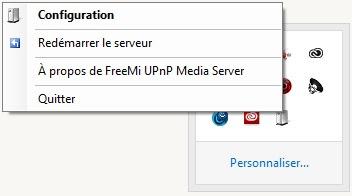
Pour ce faire, dans les icônes en bas à droite du bureau Windows, double-cliquez ou faites un clique droit puis Configuration sur l’icône de FreeMi.

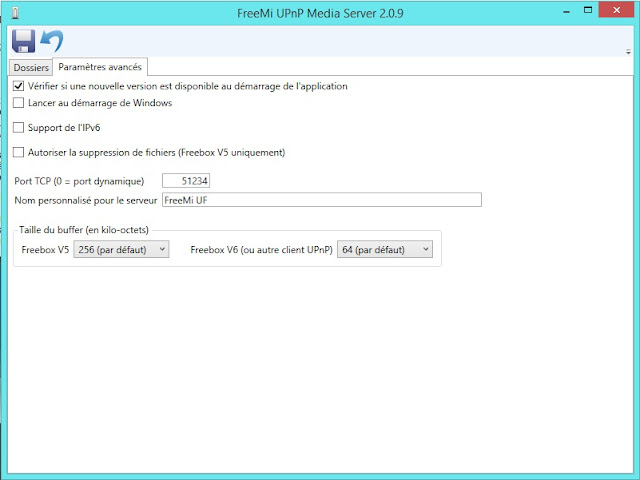
Dans l’onglet "Paramètres avancés" mettre 51234 comme port TCP et donner un nom à votre serveur UPnP.
Dans l’onglet "Dossiers" vous pouvez aussi créer de nouveaux dossiers à partager en plus de ceux déjà présents. Pour en créer un nouveau faites un clique-droit>"Nouveau">"Dossier", puis sélectionner le dossier qui vient d’être créé. Puis, dans la zone de droite, vous pourrez définir le type de média à partager ainsi que choisir le dossier de votre ordinateur à partager en choisissant le chemin du dossier.


Une fois terminé, il vous suffit d’enregistrer les modifications grâce au bouton prévu en haut à gauche. Vous pouvez accéder maintenant à vos fichiers depuis votre box.

Pour la Freebox v5/Crystal, pour accéder à vos dossiers et vos fichiers il faudra aller dans Magneto Disque Dur depuis le menu de la box. En plus du disque dur apparaîtra votre ordinateur avec le nom que vous avez rentré dans FreeMi.


Ref
http://www.universfreebox.com/article/40182/Tuto-regardez-les-films-de-votre-ordinateur-sur-la-Freebox-V5-Crystal-Mini-4K-et-Revolution

console jeux et émulateurs

La Freebox HD exploite le design manette de jeu de sa télécommande depuis le firmware 1.6.1 et l'ouverture de sa section « Jeux » le 19 novembre 2009.
Il est ainsi possible de jouer

  • à des jeux développés par Iliad (Démineur, Solitaire, Morpion, Bomberbox, Sokobox, Scavenger, Snakebox…), 
  • des jeux développés avec le kit de développement Elixir https://fr.wikipedia.org/wiki/Elixir_(Freebox) ou à des jeux émulés de consoles de jeux des années 1980-90 comme la Sega Master System, la Game Boy, la Game Boy Color et la Game Gear. 
  • programmer en javascript
    http://ftklabs.free.fr/
Pour utiliser ces émulateurs, il suffit de disposer des ROM ou de les récupérer sur l’une des plateformes web de téléchargement légal existantes et de les copier sur le disque dur de la Freebox HD ou sur un périphérique de stockage externe USB que l’on connectera à la Freebox HD.

Le 10 août 2010, la partie « Jeux » s'étend et devient une plateforme de téléchargement d'applications, le « Freestore », dans lequel sont intégrés les jeux mais aussi des applications.

Avec l'arrivée de la Freebox Révolution, la partie jeux se développe, grâce à une puissance de traitement accrue, Xavier Niel la situe entre une Wii et une PlayStation 3 « en étant plus proche de la Wii que d'une Playstation 3 », à la mise à disposition d'une manette de jeu classique filaire USB et à des partenariats conclus avec des éditeurs de jeux vidéo, notamment Gameloft qui propose quelques jeux dont certains offerts. L'utilisation d'une manette à la norme USB HID du commerce (comme beaucoup de manettes de jeu PC) ou d'une manette de PS3 raccordée en USB est possible (celles de la Xbox 360 ne sont pas compatibles). Il est, par ailleurs, tout à fait fonctionnel de se servir d'un Hub USB pour y brancher plusieurs manettes.


Wednesday, August 2, 2017

pdf and HTML5, with or without javascript? How to customize the look and feel of the PDF toolbar? interactive links


Embedding PDFs without JavaScript

be careful:
As of iOS 9, none of these examples (without JavaScript) work properly in Safari for iOS.

example with iframe

<iframe src="/pdf/sample-3pp.pdf#page=2" height="100%" width="100%">
This browser does not support PDFs. Please download the PDF to view it: <a href="/pdf/sample-3pp.pdf">Download PDF</a>
</iframe>

embed, object, iframe

https://pdfobject.com/static.html


PDF.js is a Portable Document Format (PDF) viewer that is built with HTML5. PDF.js is community-driven and supported by Mozilla Labs. Our goal is to create a general-purpose, web standards-based platform for parsing and rendering PDFs.

This extension provides PDF.js as the default PDF viewer in Chrome.
https://chrome.google.com/webstore/detail/pdf-viewer/oemmndcbldboiebfnladdacbdfmadadm?hl=en

Embedding PDFs with JavaScript

example of PDFObject 2.0 library and Mozilla's PDF.js

PDFObject is not a rendering engine. PDFObject just writes an <embed> element to the page, and relies on the browser or browser plugins to render the PDF. If the browser does not support embedded PDFs, PDFObject is not capable of forcing the browser to render the PDF.

If you need to force browsers to display a PDF, we suggest using Mozilla's PDF.js. Note that PDF.js is subject to its own limitations, such as cross-domain security restrictions. PDFObject and PDF.js play well together, there are links to some great PDF.js examples in the Examples section below.

PDFObject does not provide the ability to customize the look and feel of the PDF toolbar. The toolbar is controlled by the browser, and will vary widely from browser to browser (Chrome versus Safari versus Firefox, etc.). Some of these browsers provide the ability to show or hide the toolbar, or a feature such as the search field, via PDF Open Parameters. However, in general the browsers do NOT provide any mechanism for customizing the toolbar. If you really need to customize the toolbar, try forking Mozilla's PDF.js and customizing it to suit your needs.


PDFObject does not validate the existence of the PDF, or that the PDF is actually rendered. The assumption is that you are specifying a valid URL and the network is functioning normally. PDFObject does not check for 404 errors, and JavaScript cannot detect whether the PDF actually renders, unless you are using PDF.js, which is outside the scope of PDFObject.

PDFObject does not magically implement PDF Open Parameters. As mentioned above, these parameters are not widely supported. The PDF rendering engine either supports them or doesn't — PDFObject cannot force the rendering engine to implement these features.
https://pdfobject.com/

jQuery Document Viewer

7$
https://codecanyon.net/item/jquery-document-viewer/1732515?ref=jqueryrain&ref=jqueryrain&clickthrough_id=156843077&redirect_back=true

Display a document in a DOM element on the page
Display document in a modal window

This plugin uses pdf.js to render pdfs.

generater and parallax

http://www.jqueryrain.com/?JRJVsd1V

Android

https://play.google.com/store/apps/details?id=com.google.android.apps.pdfviewer&hl=en
http://www.apkmirror.com/apk/google-inc/google-pdf-viewer/

PDF Viewing is now available directly in Google Drive. For environments where this cannot be deployed, Google PDF Viewer offers the same capabilities in a standalone app. View, print, search and copy text from pdf documents while you're on the go.

best of viewer for CMS wordpress

embedded pdf viewer and interactive links

problems

Sunday, July 23, 2017

screenshot & OCR & copy paste google books & comparison converter image to pdf word onenote evernote


This post is in french & english... Sorry.
Désolé ce post est en français et anglais.

L’OCR, sigles de Optical Character Recognition est une technologie conçue pour analyser la structure de l’image du document et puis diviser le document en caractères, tableaux et images et aussi équations (sur une ligne)... Ensuite, le programme peut reconstituer la mise en page et les éléments en un texte modifiable.

Le convertisseur PDF est également capable de transformer un document PDF en Word, Excel ou d’autres formats éditables. Mais ce genre de logiciel ne permet que de changer le format de fichier sans analyser le contenu du texte ou sans extraire les caractères. Autrement dit, après la conversion de PDF, vous recevez quand même un fichier non modifiable contenant des images.

Ici nous intéressons à la rapidité de traitement lorsque l'on fait une copie d'écran d'un site qui protège le texte (produit du texte visualisable en image, ou comme google books ou les livres/articles en streaming).

If you don’t have a scanner, your phone or a camera can be used in place of one. There are a number of apps in the App Store (iOS mac)  android win GNU/linux that “scan” physical documents into clean PDFs using a phone’s camera.
Evernote's Scannable is just one of several apps that allows you to scan documents with your smart phone (see below).

Comparison of OCR softs

https://en.wikipedia.org/wiki/Comparison_of_optical_character_recognition_software

5 best commercial OCR softs

Abby FineReader

v14 windows and only v12 mac 12.1.6 supported macOS 10.12 Sierra (120€)
perpetual licenses
199€ (Convert PDFs and scans; Edit and comment PDFs)
or 299€ (and Compare documents  and Automate conversion 5000pages/month)

FineReader 14 offers new and enhanced features including wide range of PDF editing tools, document comparison feature and even more perceptive OCR for document conversion. Plus, faster performance across the board — from launching app to opening and converting.
PDF editing
Create PDFs from Word, Excel, and other formats
Retain text styles when exporting to Word
Single-line math formulas support
https://www.abbyy.com/en-eu/finereader/whats-new/comparison-charts/

10€ for this small utilities
https://www.abbyy.com/fr-fr/screenshot-reader/
and alternatives http://alternator.link/software/abbyy-screenshot-reader

ABBYY Real-Time Recognition SDK for mobile apps.
Extracting text directly from the smartphone’s preview screen is significantly faster and more convenient than taking a picture of the text followed by an OCR step

ABBYY Mobile Imaging SDK
The toolkit to analyze photos of documents captured with mobile devices to determine whether they are suitable for OCR or enhance their visual quality.

PDFELEMENT

59€
mac/PC
Autre point fort de l’outil, il est capable de rendre les formulaires numérisés modifiables et d’exporter les données numérisées au format CSV.

http://www.leptidigital.fr/technologie/logiciels-ocr-8915/

Omnipage

Omnipage 18 windows XP to 10
99€
educ: 69€

SDK win, linux, mac
http://www.nuance.fr/for-business/by-product/omnipage/for-developers/index.htm
http://www.nuance.fr/for-business/by-product/omnipage/for-developers/csdk-for-mac/index.htm

Readiris

Readiris 16
99€
mac/pc/iOS
OSX 10.9, 10.10,10.11 and 10.12
http://www.irislink.com/EN-US/c1466/Readiris-16-for-Macintosh---OCR-Software.aspx

Create indexed PDF files
This format is identical to the original PDF file except that it adds a layer of indexed text. This means you can easily search for the information you need in a document or a large volume of archived documents.
SDK
http://www.irislink.com/EN-US/c1096/iDRS-15.aspx

Skysoft PDF Editor 6 Professional for Mac or Win

commercial 99€
https://pdf.iskysoft.com/6std-vs-6pro.html

Renee PDF

par un français et gratuit mais que windows et pas open source
https://www.reneelab.fr/product-land-337.html

Ref

https://pdf.wondershare.fr/pdf-editing-tips/pdf-ocr-software.html

Prise de note, de scan, de photo et OCR limité

Greenshot

free soft and open source 
only windows
http://getgreenshot.org/
Greenshot is a light-weight screenshot software tool for Windows with the following key features:

Quickly create screenshots of a selected region, window or fullscreen; you can even capture complete (scrolling) web pages from Internet Explorer.
Easily annotate, highlight or obfuscate parts of the screenshot.
Export the screenshot in various ways: save to file, send to printer, copy to clipboard, attach to e-mail, send Office programs or upload to photo sites like Flickr or Picasa, and others.
...and a lot more options simplyfying creation of and work with screenshots every day.

Being easy to understand and configurable, Greenshot is an efficient tool for project managers, software developers, technical writers, testers and anyone else creating screenshots.

Screenshot to Speech

6€
http://macgenius.co/app/Screenshot-to-Speech/955098738
Poor OCR recognition

picatext

osx 10.12
4€
You need to get the text out of an image or from anywhere on your screen? With picatext this is as easy as selecting a file or a screen area. So now you can get the text you need in almost no time. No need to tediously typewrite everything again.
picatext is OCR made simple. We included just the functionality you need. Nothing that might distract you. That helps focusing on the important things and saves you a lot of time.
These are the awesome features of picatext:
- get text from images
- extract text from your screen
- supports the recognition of over 40 languages
- start screen selection by shortcut
- text gets copied to clipboard automatically
- set the font of the output text
http://www.macdrifter.com/2013/10/picatext-for-image-ocr-on-mac.html

Prizmo

50€
https://computers.tutsplus.com/tutorials/5-ways-to-ocr-documents-on-your-mac--mac-49683
https://creaceed.com/prizmo
https://itunes.apple.com/app/id546392952
Prizmo is a dedicated OCR app. It isn’t designed to help you crop or straighten your scanned documents, it’s sole purpose is to analyse the text of any scans and convert it into searchable text. It’s not just limited to plain text documents such as receipts and correspondence, Prizmo will even analyse old newspapers and magazines, book covers, pretty much anything with any shape, size and colour of text is something Prizmo will convert.
Prizmo includes the ability to capture scans directly from Image Capture, OS X’s built-in camera and scanner import app, so you can use it in conjunction with any existing scanner. You can also import existing files if you’ve been scanning them already.

Skim Clip

very good software.
It's the best for screenshot and built-in OCR.
http://www.domloveskim.com/software/skim-clip/#download
http://kimlovingnews.blogspot.fr/2012/08/skim-clip-11-headed-to-mac-app-store.html (the last post=dec 2012).
https://maczot.com/discuss/2012/11/23/skim-clip1353651425/

oldies dec 2012; shareware 10$. only MAC >10.6. Works on sierra 10.12.
The trial version is limited to 10 minutes of use at a time and has a 10 second delay at start up.

It uses tesseract (which support for a number of new image formats was added using the Leptonica library http://www.leptonica.com/). Leptonica is a pedagogically-oriented open source site containing software that is broadly useful for image processing and image analysis applications.
In addition to the freeform selection, we've added (v 1.1) a few more features such as playing a sound when clipping, an option to remove all headers from the exported output, and the ability to use a script to filter the OCR text before it is saved as a clipping. This last feature, filtering, is particularly interesting because it opens up many work flow possibilities as you may apply your understanding of UNIX and scripting tools like sed (https://en.wikipedia.org/wiki/Sed) and Perl to perform all kinds of creative transformations and processing on the scanned text.
Skim Clip is a unique new utility for OS X that combines Optical Character Recognition (OCR) with screen capture features to create a powerful and convenient new way of saving and organizing your information.
Using Skim Clip, you can capture the contents of any window, scan and save all its text including words in images, and store it into organized categories - all with a single keypress.
With the clipping converted into scanned computer text, you can instantly search thousands of clippings to find what you're looking for. Like a photographic memory with a search engine, Skim Clip makes it easy to keep, find, and reuse anything that's ever on your screen!

Features (v 1.0) include:
* Instantly clip with a single hot key from any application
* Fast and accurate OCR text conversion of any screen
* Scales to easily manage thousands of clippings
* Very quickly search OCR text, notes, and more
* Reuse your clipping by emailing, saving, and pasting them
* Present your clippings with slideshows and quicklook
* Create clipping categories and subcategories
* Export dozens of clippings in a single click
* Browse your clippings as thumbs or a listing
* Get visual feedback and categorize anywhere with the status menu
* Set your own hot key, export style, and more
* Automated custom scanned text processing
* Integrate Skim Clip into your workflow with AppleScript
* Double tap the hot key to instantly add a note for extra convenience
* Elegant interface to help keep your clips organized
* Keep focused on your work with Skim Clip always ready
* Optimized OCR for English with support for other languages

Version 1.1:
Clip anywhere on the screen by holding the clip hot key for freeform selection
Custom filtering of scanned text for advanced processing
Automate clipping with AppleScript
Improved image processing for better accuracy
Sound effect when clipping
Option to remove headers when exporting
Increased mail export compatibility
Plain text...

We've been invited to share the following comments from one Jim Miller, author of the well-regarded Rabbi Hawkins Mystery Series. Here's what Mr. Miller has to say about Skim Clip:
Skim Clip is amazing. I’m usually disappointed by Apps that claim to do everything, including saving the world, and then do nothing at all. That is not the case with Skim Clip. It does exactly what the developer says it will do. It is a screen capture and OCR combo that works.
Another plus for this program is the obvious time and effort that has gone into making the user manual simple and easy to understand. I was able to walk through the step-by-step instructions and capture a variety of screen shots. I do a lot of screen shots with the Mac’s commands, but they all end up as jpegs. With Skim Slip, I get the jpeg and if I choose, I can convert it into text and then insert it into Word, Pages and Scrivener very easily.
This is a timesaver I love. I used to cut and paste a captured image into a word processor or have it up on the screen so that I could then type the content into some other program just to make it useable. Not anymore. With Skim Clip, it’s all done for me.
Many thanks to Dominic and Kimberly,  (DomLovesKim Company)
Jim Miller
http://kimlovingnews.blogspot.fr/2012/10/from-author-using-skim-clip.html

Only for Intel, 64-bit processor, Mac OS X 10.6 or later, 64-bit processor
put the text OCR in the copy-buffer.

I try this soft on MAC 10.12.5 on chrome and others browsers :  it's the fastest.
Some minor pb with OCR when characters are tiny, just expand your window or try increasing your application's font size.
If you want another soft (but also oldies 2013), use PDF OCR X Community Edition (it also uses this Tesseract code) is a simple drag-and-drop utility for Mac OS X and Windows, that converts your PDFs and images into text documents or searchable PDF files. You must save the screenshot to a file (img) and drag-and-drop to it and copy the text. Then Skim Clip is faster and far better.

LEADTOOLS OCR App Review and SDK

iOS and android
https://www.leadtools.com/blog/document-imaging/leadtools-ocr-app-review/

OneNote

use Microsoft OneNote's built-in OCR functionality (free for Windows/Mac) ; it's in Pack Office.

menu
copy img
(right clics) copy picture to text

https://webapps.stackexchange.com/questions/57418/how-can-i-copy-paste-segments-from-google-books
In OneNote, users can enter typed text via keyboard, create tables, and insert pictures. However, unlike a word processor, users can write anywhere on a virtually unbounded document window by just clicking there. Also, users do not need to explicitly save their work – OneNote saves data automatically as the user works.
Microsoft also announced a number of new features in OneNote that use the service API:
OneNote Clipper: A browser bookmarklet that uses the OneNote service API and enables users to save a screenshot of a webpage to OneNote along with the link. The text in the screenshot is made searchable using Optical Character Recognition
https://en.wikipedia.org/wiki/Microsoft_OneNote

Evernote

As well as the keyboard entry of typed notes, Evernote supports image capture from cameras on supported devices, and the recording of voice notes. In some situations, text that appears in captured images can be recognized using OCR and annotated. Evernote also supports touch and tablet screens with handwriting recognition. Evernote web-clipping plugins are available for the most popular Internet browsers that allow marked sections of webpages to be captured and clipped to Evernote. If no section of a webpage has been highlighted, Evernote can clip the full page. 
Where suitable hardware is available, Evernote can automatically add geolocation tags to notes.

In 2010, the coding language for the suite was changed from C# for version 3.5 to C++ in version 4.0 to improve performance.
On supported operating systems, Evernote allows users to store and edit notes on their local machine, using a SQLite database in Windows.

The Evernote software can be downloaded and used as "stand-alone" software without using the online portion of an Evernote account (online registration is required for initial setup, however), but it will not be able to upload files to the Evernote server, or use the server to synchronize or share files between different Evernote installations. Also, no image or Image-PDF (Premium only) recognition and indexing will take place if the software is used entirely offline.

In June 2016, Evernote announced the limitation for users of its free Basic account to two devices per year and raise prices for its premium service tiers.Non-paying Evernote user is able to sync notes between two devices.

https://en.wikipedia.org/wiki/Evernote
https://help.evernote.com/hc/fr

Evernote does OCR images so they're searchable,  but the text is not extractable from the image.  OneNote is better for that specific use case - the text (or the best approximation of it) is available in a separate window to be copied and pasted elsewhere.  Voice to text is part of Evernote,  though you'd need to use one of the specialist pen inputs if you want to choose specific parts of the text to hear again.
in fact no OCR (may be with premium and for some specific img (buz card)).


Evernote with other apps:
Skitch is a free screenshot editing and sharing utility for OS X (iOS, Windows, and Android). The app permits the user to add shapes and text to an image, and then share it online. Images can also be exported to various image formats. Originally developed by Plasq, Skitch was acquired by Evernote on August 18, 2011. On December 17, 2015, Evernote announced that it will be ending support for Skitch for Windows, Windows Touch, iOS, and Android on January 22, 2016. Evernote said it will continue to offer Skitch for Mac and  iPad iPhone.
https://evernote.com/intl/fr/products/skitch

8 choices:
  1. Capture Viseur 
  2. Zone de capture précédente
  3. Capture viseur différé 
  4. Capture plein écran 
  5. Capture fenêtre... 
  6. Capture menu...
  7. Capture avec |'appareil photo... 
  8. Ouvrir une Image ou un PDF...

Scannable
If you're a die-hard Evernote user, Scannable may be the best option for you...assuming you use an iOS device, that is. Scannable on the iPhone and iPad allows you to instantly scan business cards, sketches, receipts, paper documents, and even multi-page documents with ease, and automatically file and organize the resulting images and files in your Evernote account. Your scans are automatically cropped to remove backgrounds (like the table behind the recipt, for example) and enhanced so the text is readable. If you scan a business card, the contact information from the card is automatically lifted and added to a contact card, so you can call the person, email them, or visit their website or social presence with a single tap. It's relatively new, and while it works best with Evernote, it also allows you to share your resulting scan with other apps on your iOS device, so you can upload it to Dropbox, email it, or save it to your camera roll. Best of all, it's completely and totally free—no unlocks, no premium version, although it definitely works best if you also use Evernote.
It is the business card wingman that knows the card is significant only because of the information it holds. While the paper is trivial, its words are full of potential. Once you connect to Evernote and LinkedIn, Scannable immediately digitizes every business card you scan. It takes that information and adds in details from your contact’s LinkedIn profile, including a photo, so you’ll always be able to put a face to the name. Instantly save the person to your contact list and feel free to ditch the paper entirely (we won’t tell anyone).
Scannable captures the paper in your life quickly and beautifully, transforming it into high-quality scans ready to save or share. Whether on the go or at the office, send paper on its way and move on.
Evernote's Scannable is just one of several apps that allows you to scan documents with your smart phone.
only for iPad & iPhone.

penultimate
Penultimate is the award-winning digital handwriting app for iPad that combines the natural experience of pen and paper with power of Evernote’s sync and search features. Lose the paper, keep the handwriting.
only for ipad
https://evernote.com/intl/en/products/penultimate

Evernote Web Clipper
Save webpages forever
From interests to research, save anything you see online—including text, links, and images—into your Evernote account with a single click.
plug-in for many browsers
https://evernote.com/intl/en/products/webclipper

evernote inc  and github
https://github.com/evernote

 Evernote and OneNote

comparison between 

Google OCR and drive

Google Drive includes a little-known free OCR tool that is a powerful, easy to use image to text converter.
Google Drive currently supports OCR for .jpg, .gif, .png, and PDF files up to 2MB in size

To add your documents to Google Drive to get them OCRed, first go in to your Google Drive account. On the My Drive page, click the My Drive button next to the New button on the left side of the page. Select Upload Files.
Use the Upload files option to upload a file to Google Drive. Find the file that you want to convert from PDF or image to text. Click the Open button. 
The document now appears in your Google Drive. Right-click on the document to bring up a drop-down menu.
Click the Open with option and click Google Docs. A sheet icon appears while the file is downloading. Google is now in the process of converting your PDF or image file to text with OCR.
The file will open in Google Docs with the PDF converted to text, but with little formatting applied. You can now edit and format the new text file as you like.
You will get:


Tutorial:

Free and Open soft

https://turtlapp.com/docs/
no OCR

Free Open source OCR

Comparison of the 3 open source OCR

Tesseract 

Tesseract has unicode (UTF-8) support, and can recognize more than 100 languages "out of the box".
Tesseract supports various output formats: plain-text, hocr(html), pdf, tsv, invisible-text-only pdf.
You should note that in many cases, in order to get better OCR results, you'll need to improve the quality of the image you are giving Tesseract.
Tesseract does various image processing operations internally (using the Leptonica library) before doing the actual OCR. It generally does a very good job of this, but there will inevitably be cases where it isn't good enough, which can result in a significant reduction in accuracy.
Installing Tesseract
You can either Install Tesseract via pre-built binary package or build it from source.
Supported Compilers are:
  • GCC 4.8 and above
  • Clang 3.4 and above
  • MSVC 2015, 2017
The Tesseract engine was originally developed as proprietary software at Hewlett Packard labs in Bristol, England and Greeley, Colorado between 1985 and 1994, with some more changes made in 1996 to port to Windows, and some migration from C to C++ in 1998. A lot of the code was written in C, and then some more was written in C++. Since then all the code has been converted to at least compile with a C++ compiler. Very little work was done in the following decade. It was then released as open source in 2005 by Hewlett Packard and the University of Nevada, Las Vegas (UNLV). Tesseract development has been "sponsored" by Google since 2006.
https://en.wikipedia.org/wiki/Tesseract_(software)
Tesseract is executed from the command-line interface.
Basic command line usage:
tesseract imagename outputbase [-l lang] [--oem ocrenginemode] [--psm pagesegmode] [configfiles...]
For more information about the various command line options use tesseract --help or man tesseract.
GUIs and Other Projects using Tesseract OCR
While Tesseract is not supplied with a GUI, there are many separate projects which provide a GUI for it. One notable example is OCRFeeder (end 2014).
https://github.com/tesseract-ocr/tesseract/wiki/User-Projects-%E2%80%93-3rdParty

PDF OCR X (uses this Tesseract code) is a simple drag-and-drop utility for Mac OS X and Windows, that converts your PDFs and images into text documents or searchable PDF files. It uses advanced OCR (optical character recognition) technology to extract the text of the PDF even if that text is contained in an image. This is particularly useful for dealing with PDFs that were created via a Scan-to-PDF function in a scanner or photo copier.
mac/win
0€=Limited to single-page images and PDFs (pro=29€ for unlimited pdf size)
http://solutions.weblite.ca/pdfocrx/

other projects with tesseract code

  • Online OCR services
  • Android/iOS
  • ocr-fileformat is a converter: Validate and transform between OCR file formats (hOCR, ALTO, PAGE, FineReader)
  • Audiveris is an open-source Optical Music Recognition software which processes the image of a music sheet to automatically provide symbolic music information in MusicXML standard.
  • Wolfram Mathematica 9.0 use tesseract for recognizing text
  • OCRmyPDF - Adds OCR text layer to scanned PDF files and images, allowing them to be searched. Processes pages in parallel on multi-core CPUs. Keeps exact resolution of original embedded images without recompressing JPEGs, when possible. Includes image several preprocessing options, detailed documentation, and support for many exotic PDFs.
  • Tally-Ho: Tally-Ho is a screen reader intended for sites like google books
    https://code.google.com/archive/p/tallyho/
    Tally-Ho is a screen reader intended for sites like google books (though it will also read anything copied to the clipboard). google books is a great site, especially if you're a Ph.D. student - however, for people who are visually impaired or dyslectic (or, like my gf, both...), it is quite inaccessible. Tally-Ho uses the Tesseract OCR engine (thanks google!) to convert the screen capture to text, so it can read graphic based sites such as google books. tested on windows xp sp2 w/at&t natural voices & vista w/microsoft
    End of dvpment 2008
  • IMPACT is a project funded by the European Commission. It aims to significantly improve access to historical text and to take away the barriers that stand in the way of the mass digitisation of the European cultural heritage. END = 2012 and other forks...
    http://www.impact-project.eu/
  • MathOCR Features mathematical formula recognition and logical layout analysis, can use OCR engines like Tesseract or Ocrad as back-end. https://github.com/chungkwong/MathOCR
    END=2015.

GOCR

END=2013

Cuneiform

https://en.wikipedia.org/wiki/CuneiForm_(software)
END=2011

web services OCR


alternatives open free à adobe première. Liste et comparaison pour mélanger video (y compris AVCHD) et photo et music.


Intro

l'excellent VLC hélas n'est qu'un player. On l'utilisera pour visualiser le résulat final.

besoins

Je veux un éditeur/publisher qui mixe image et video pour faire ce job:
j'ai bcp de video et photo sur mon portable ou mon téléphone et je veux faire une seulz video avec un son per exemple une chanson ou en gardant le son des video.

Je veux faire des captures d'écran et enregistrer du son puis faire une video... (voir les options des éditeurs).

Import image sequences from your camera to create a cartoon frame by frame. Then, export as an animated GIF or share on YouTube.

info

En sept 2017 google "tue" ses outils youTube de l'éditeur de vidéo et du diaporama "intégré".
https://www.engadget.com/2017/07/21/youtube-kills-the-video-editing-tools-you-never-used/
L'édition vidéo sur Internet est lente par rapport aux applications natives, car il faut télécharger (upload) votre vidéo puis télécharger (down) la copie finale. Cela dit, c'était une bonne option pour les utilisateurs ou les utilisateurs de Chromebook avec des ordinateurs portables ou des tablettes peu puissantes.

Si vous êtes prêt à payer et que vous disposez d'un PC ou d'un Mac approprié, d'autres applications autonomes incluent
Adobe Premiere CC,
Final Cut Pro X d'Apple pour Mac uniquement
Media Composer professionnel d'Avid. Avid a également une application gratuite appelée Media Composer First,

Apple a iMovie pour Mac et iMovie et Clips pour iOS,
tandis que Microsoft possède Movie Maker pour Windows.
Si vous voulez juste un éditeur Web, il existe des options comme Magisto et WeVideo qui fonctionnent sur la plupart des navigateurs, y compris le navigateur Chrome sur Chromebook.

But

ce post va traiter des offres "libre et open".

Une comparaison
https://en.wikipedia.org/wiki/Comparison_of_video_editing_software

Il faut aussi vérifier si le logiciel prend en charge vos fichiers comme AVCHD (Advanced Video Codec High Definition). voir une liste de soft d'édition qui prend en charge ce format:
https://fr.wikipedia.org/wiki/Advanced_Video_Codec_High_Definition

Les aggrégateurs photo video avec schémas

avant d'aborder les "premières"-light, qq nouveaux softs de 2017 pour aller vite dans la production de video à partir d'un stock de media.

quik de goPro

que iphone/ipad and android

clips d'Apple

que iphone/ipad 
The app allows users to combine videos, images and music into one seamless video ready to be shared not only via the likes of Facebook, Twitter and Instagram, but also via iMessage too.
It sits somewhere between the video generator baked into the Photos app in iOS 10 and iMovie for iOS, which is regarded as being a high-end video editing app (in terms of smartphone apps, anyway!).
Clips is a new app for making fun videos to share with friends, family and the world. With a few taps, you can create and send a video message or tell a quick story with animated text, graphics and emoji, music and more. 

Videos made easy
•    Clips lets you create videos in real time using simple controls — no timeline, tracks or complicated editing tools
•    Shoot live video and photos or add them from your library
•    Easily mute audio, and adjust the length of your clips and reorder them
•    Clips looks and works great on iPhone, iPad and iPod touch

Live Titles
•    Create animated titles and captions using just your voice
•    Captions are generated automatically as you speak and match the timing of your voiceover
•    Mix and match different styles throughout your video
•    Tap your title to adjust text and punctuation or add inline emoji 

Fun effects
•    Give your photos and video clips a comic book look with colour and black & white filters
•    Drop in animated speech bubbles, arrows and banners
•    Add emoji on top of any photo or video clip
•    Use full-screen posters with animated backgrounds and customisable text to help tell your story
• Drag and pinch while recording to add smooth pan and zoom animations to your photos and videos
•    Add a music track from your library or use built-in soundtracks that automatically adjust to the length of your video

Smart sharing
•    Clips suggests people to share with based on who is in your video and who you share with most often
•    Tap a person in the share sheet to instantly send your video via Messages
•    Send directly to Instagram, Facebook, YouTube and other popular social media sites

Apple Web SiteClips SupportApplication Licence Agreement

What's New in Version 1.1 (07/2017)
• Customise your videos with animated Disney graphics featuring Mickey, Minnie and more
• Add Pixar graphics to your videos with characters from Toy Story and Inside Out
• Choose from dozens of new customisable text banners, overlays and posters

vimeo tools

wevideo

web services & que iphone/ipad and android and win 10

Storyo

Storyo creates stories automatically based on the metadata in your photos (like time and location) along with other bits and pieces of information it harvests online, like maps. It brings photos and data together in beautifully simple video-stories, called storyos.
Automated Storytelling
A single photo or simple sequence of shots just doesn’t do your most magnificent moments justice. That’s why we’ve designed an intelligent algorithm that organizes photos in chapters according to when and where great times took place. The result is a true-to-life story told in narrative form – from fabulous beginning to fantastic end.
But it’s your story, so feel free to tweak it until you love it - add or delete photos, change its length, play around with filters, or switch the soundtrack to a song from your own music library.
https://www.storyoapp.com/

OpenShot

OpenShot Video Editor est un éditeur vidéo non-linéaire libre pour GNU/Linux, construit avec Python, GTK+, et le framework MLT (Media Lovin' Toolkit (en)). Il intègre le moteur Blender pour créer des titres et effets (feux d’artifices, jeux de lumières, neige, mappemonde animée) évolués.
AVCHD (Advanced Video Codec High Definition)  OK
Linux, Mac, and Windows.
http://www.openshot.org/
https://en.wikipedia.org/wiki/OpenShot

Kdenlive 

https://kdenlive.org/
https://en.wikipedia.org/wiki/Kdenlive
https://kdenlive.org/toolbox/
FreeBSD, Linux, Windows,
OSX: Kdenlive and MLT can compile and run under Mac OS X. Packages are available from the MacPorts project, unfortunately they are outdated.

Shotcut

FreeBSD, Linux, OS X, Microsoft Windows

VideoPad Video Editor

Video Editing Software 
Windows XP/Vista/7/8/8.1/10
Works on Mac OS X 10.5 and above
Android version runs on 2.3.3 or higher

-un des processeurs de streaming vidéo les plus rapides du marché.
-effets sonores de la sonothèque gratuite

http://www.nchsoftware.com/videopad/index.html

photofilmstrip

PhotoFilmStrip creates movies out of your pictures in just 3 steps. First select your photos, customize the motion path and render the video. There are several output possibilities for VCD, SVCD, DVD up to FULL-HD.
The effect of the slideshow is known as "Ken Burns". Comments of the pictures are generated into a subtitle file. Furthermore an audio file can be specified to setup the background music for the slide show.
In contrary to other projects i know so far, PhotoFilmStrip has the opportunity to render slide show in Full-HD (1920x1080) resolution.

GUI or command line interface for batch processing
python
Win, GNU-linux

http://www.photofilmstrip.org/1-1-Home.html

Friday, July 21, 2017

Blablacar et concurrents gratuits sans commission de l'éditeur du site.


L’engouement pour le covoiturage est aussi un marché économique dominé par un acteur majeur qui s’est taillé un nom et un presque-monopole au point que pour beaucoup c’est le mot blablacar qui remplace le mot covoiturage dans les recherches sur Internet. On peut saluer le succès de l’entreprise comme le font depuis plusieurs années la plupart des médias.
https://fr.wikipedia.org/wiki/BlaBlaCar
Le 18 mai 2015, BlaBlaCar signe un accord d'assistance avec la société Axa pour assurer ses utilisateurs lors de leur déplacement.
Service que rend blablacar, notamment concernant l’assurance arrivée à destination garantie, ainsi que le rachat de franchise...
On peut aussi s’interroger sur cette confiscation et monétisation d’une pratique solidaire gratuite : le modèle économique de Blablacar repose sur la captation d’un bien commun.

Comparaison sur 5ans entre la recherche "covoiturage" et "blablacar" avec le moteur de Google sur 5 ans à partir du 20 juillet 2017.
https://trends.google.com/trends/explore?date=today%205-y&geo=FR&q=covoiturage,%2Fg%2F11b5v2gkf7


On constate sur ce critère de "trends" que l'ouest est plus demandeur.


sans commision et gratuit pour le passager (vrai auto-stop)
https://www.laroueverte.com/
mais peu d'utilisateur...

Des économies plus importantes pour les conducteurs, des voyages vraiment moins chers pour les passagers et les prix sont fixés par les conducteurs (le site ne prélève aucune commission sur les trajets, nous ne vivons que de dons):
https://covoiturage-libre.fr/

le code source du site:
https://github.com/covoiturage-libre/covoiturage-libre
Une première version a été mise en ligne quelques jours seulement après le passage au payant de la part de Blablacar (ce devait être en 2011).

La première version a été développée en solo par Nicolas Raynaud. Le site à cette époque avait été écrit en PHP. C’est peu après qu’a été créée l’association pour soutenir la plateforme. Une nouvelle version du site a plus tard été écrite en Ruby on Rails, car la première version était difficile à maintenir et ne permettait pas vraiment un travail collaboratif. Cette nouvelle mouture du site est assez récente, date de moins d’un an, c’est maintenant sur celle-ci que nous travaillons, les améliorations étant poussées… lorsqu’elles sont prêtes à l’être.


Ref

https://framablog.org/2017/06/29/pour-un-covoiturage-libre-sans-blabla-car-cest-un-bien-commun/

Thursday, July 20, 2017

HUB text/PAO une syntaxe pour différentes cibles input et output (backends, targets ou writers), de manière à obtenir du HTML du LaTeX, page de man: pandoc


hexadécimal

Au départ si on a que du texte sans mise en forme, on peut écrire en hexadécimal comme dans ma jeunesse des années 70 (en ASCII ou étendue pour les caractères français par exemple). Il suffisait de connaitre par coeur la table ASCII de 128 correspondances qui est une norme informatique de codage de caractères des années 60. Et tout cela avec un clavier de 0-9 et A-F soit 16 touches (même pas une touche carriage return  car c'est le code #D ni même une touche espace car c'est #20)!
http://ascii.cl/
Et pour l'histoire:
https://fr.wikipedia.org/wiki/American_Standard_Code_for_Information_Interchange

C'était clair, il y avait celui qui tapait ses idées au kilomètre puis celui qui mettait en forme.

que du text mis en forme (et un peu de "PAO") et comparaison des softs

Si on a que text (par exemple ASCII ou UTF-8) c'est assez simple.
Avec du balisage léger et des transcodeurs, on a du Hub-text.
voir une liste partielle des output formats:
https://en.wikipedia.org/wiki/Lightweight_markup_language

https://en.wikipedia.org/wiki/Comparison_of_document_markup_languages

https://en.wikipedia.org/wiki/Comparison_of_documentation_generators
(and  programming languages).
example: ROBODoc is a documentation tool similar to Javadoc and licensed under the GPL. It is used to extract API documentation from source code. It can be used with any language that supports comments and works by extracting specially formatted headers. These are then reformatted into HTML, DocBook, TROFF, ASCII, LaTeX, PDF, or RTF.
It can be used to document any programming artifact, such as: classes, functions, tests, makefile entries, etc.
ROBODoc works with C, C++, Fortran, Perl, shell scripts, Assembler, DCL, DB/C, Tcl/Tk, Forth, Lisp, COBOL, Occam, Basic, HTML, Clarion, and any other language that supports comments.
https://en.wikipedia.org/wiki/ROBODoc


Une analyse que je partage

Comparaison des langages de balisage (markup) léger (lightweight) : Txt2tags, Pandoc, Docutils, AsciiDoc, Deplate, Stx2any, AFT, Markdown et Textile:
http://fgallaire.flext.net/comparaison-langage-balisage-markup-lightweight-leger-txt2tags-pandoc-docutils-asciidoc-deplate-stx2any-aft-markdown-textile/

La bureautique est la principale utilisation de l’informatique depuis sa création. Pourtant, les outils majoritairement utilisés dans ce domaine, les logiciels de traitement de texte WYSIWYG comme LibreOffice ou MS word, laissent la majorité des informaticiens et des ergonomes totalement désespérés.
Ces logiciels ont en effet un nombre de défauts très important : ils font se concentrer sur la forme et non sur le fond, leur résultat final ne correspond souvent pas à ce qui est affiché, ils sont incompatibles entre eux, ce sont d’énormes usines à gaz, ils ne fonctionnent qu’en mode graphique, etc.

Il a donc fallu penser à une manière de donner ces instructions de mise en forme au sein du fichier texte lui-même, et c’est ainsi que sont apparus les langages de balisage (markup), dont les plus connus sont HTML (inventé en 1991 par Tim Berners-Lee) et LaTeX (créé en 1985, et basé sur TeX, inventé par le grand Donald Knuth en 1977), et dont la première grande figure fut Roff, un programme Unix historique développé à partir de 1961, et dont la version GNU, Groff, est installée par défaut sur toutes les distributions GNU/Linux, puisqu’on l’utilise encore pour les pages de man des logiciels.

Ces langages représentent une nette amélioration, mais ont tous un gros problème : ils sont gênants ! On ne retrouve plus aussi facilement son contenu au milieu de toutes ces balises supplémentaires, sans parler du fait que les syntaxes complexes ouvrent la voie à de nombreuses erreurs de compilation.

C’est en 1995 que l’on trouva la solution de ce problème, avec la création du premier langage Wiki, dont le but principal était de permettre l’édition facile de pages web par tout un chacun, et dont l’utilisateur actuel le plus célèbre est l’encyclopédie libre Wikipédia. S’il y a presque autant de syntaxes différentes que de logiciels Wiki, elles ont toutes la caractéristique d’utiliser des caractères textuels simples et intuitifs pour donner les indications de formatage du texte.
http://www.wikicreole.org/wiki/Reasoning

https://www.mediawiki.org/wiki/Help:Formatting
https://fr.wikipedia.org/wiki/Aide:Syntaxe_(wikicode)
https://fr.wikipedia.org/wiki/Aide:Ins%C3%A9rer_un_tableau_(wikicode,_avanc%C3%A9)
https://fr.wikipedia.org/wiki/Mod%C3%A8le:BUtilisateur
https://www.mediawiki.org/wiki/MediaWiki/fr

J'ai toujours aimé le principe du "folding editor".
le premier fut STET  'STructured Editing Tool' de 1977
https://en.wikipedia.org/wiki/STET_(text_editor)
A folding editor is a text editor which supports text folding or code folding, a mechanism allowing the user to hide and reveal blocks of text—usually named. Typically this is done to allow the user to better picture the overall structure of a document or program.
Folding is provided by many modern text editors, and syntax-based or semantics-based folding is now a component of many software development environments...
https://en.wikipedia.org/wiki/Folding_editor


Mais pourquoi limiter ces langages de balisage léger à la seule génération de HTML ? Pourquoi ne pas utiliser la même syntaxe pour différentes cibles (appelées backends, targets ou writers selon les logiciels), de manière à obtenir aussi bien une page web en HTML, qu’un document en LaTeX pour l’impression, ou qu’une page de man pour un logiciel ? Ce sont les logiciels qui poursuivent ce but qui m’intéressent, ils constituent pour moi l’avenir de la bureautique informatique, et j’ai été amené à les comparer pour en choisir un dans lequel m’investir comme développeur.

Trois d’entre eux, Docutils, Deplate et Pandoc, ont un design évolué, avec une machine à états finis pour laquelle on peut écrire de nouveaux readers et writers de manière parfaitement propre. Cependant, malgré leurs grandes qualités, Deplate est un projet trop confidentiel (ainsi il n’est incompréhensiblement pas présent parmi les pourtant si nombreux paquets Debian), et je ne me sentais pas à la hauteur pour m’investir dans un projet comme Pandoc, totalement écrit en Haskell, qui est un langage de programmation complexe que j’aimerais beaucoup utiliser.
Je détaillerai Pandoc ci-dessous.

Txt2tags

J’ai rajouté dans ce comparatif Markdown et Textile, puisqu’ils ont chacun une implémentation en Python, mais ne générant que du HTML, ils ne m’intéressaient pas vraiment. AsciiDoc et Txt2tags ont un peu la même architecture, avec un gros fichier principal faisant tout le travail, que l’on peut configurer, respectivement avec un fichier .conf et deux dictionnaires Python (un pour les Tags et l’autre pour les Rules), pour créer de nouvelles cibles. AsciiDoc et Txt2tags sont donc plus aisés à prendre en main et à modifier rapidement que Docutils, qui est une très belle et très bien architecturée machine à états objet, mais aussi plus difficile à appréhender.
De plus, comme je désapprouvais totalement la politique de licence domaine publique de Docutils, il ne me restait plus qu’à faire mon choix entre Txt2tags et AsciiDoc. C’est principalement l’orientation très DocBook (un format ne m’intéressant personnellement pas du tout) d’AsciiDoc, et d’autres détails, comme la localisation en de nombreuses langues de Txt2tags et sa plus grande simplicité, qui m’ont finalement fait choisir Txt2tags.

Ce choix est confirmé par une étude plus avancée des différentes syntaxes. Ainsi alors que la syntaxe reST de Docutils ne dispose que de :

*italique* et **gras**

Txt2tags est beaucoup plus riche :

//italique// **gras** __souligné__ et --barré--

Le codage visuel est bien meilleur, et le compréhension instantanée avec la syntaxe de Txt2tags, puisque les slashs donnent l’impression penchée de l’italique, les étoiles imitent la surcharge du gras, les underscores donnent l’impression de soulignement, et les moins apparaissent comme une barre. De plus, l’utilisation généralisée des caractères de balisage en doubles, permet de lever à peu de frais un maximum d’ambiguïtés syntaxiques.

insertion d'une image est beaucoup plus simple Txt2tags
[[picture.png] http://fgallaire.flext.net]

Leur implémentation en Python permet à Txt2tags, reST (par Docutils) et AsciiDoc d’être utilisables à la fois comme logiciels de bureautique multiplateforme (Linux, Mac OS X, Windows et *BSD) et pour le web côté serveur. Depuis 2012, une implémentation de txt2tags en PHP est disponible, développée par Petko Yotov (le mainteneur et principal développeur de PmWiki) et sponsorisée par Eric Forgeot. Grâce aux nombreux efforts de ce dernier, il existe maintenant plusieurs implémentations de la syntaxe Txt2tags en JavaScript, avec une démo parfaitement fonctionnelle des possibilités de rendu côté client en temps réel. Et Matthew Pickering a quant à lui écrit un reader Txt2tags pour Pandoc.
En face, Markdown est représenté par une armada d’implémentations dans tous les langages utilisés sur le web côté serveur, et aussi en JavaScript côté client pour des prévisualisations efficaces sans Ajax, mais seul Pandoc, qui n’est pas si facile à compiler sur toutes les plateformes, propose autre chose qu’un rendu en HTML.
Je vais bien sûr continuer à travailler sur le logiciel Txt2tags, mais une implémentation de la syntaxe Txt2tags dans un parser Docutils, pour toucher directement toute la communauté des développeurs Python qui documentent leurs projets, et pouvoir bénéficier ensuite du sublime Sphinx, est un projet qui me motive de plus en plus.
Enfin, je suis toujours un peu nostalgique devant ce screenshot, parce que c’est en le voyant, avec en haut à gauche le fichier avec les balises, et en bas à droite celui avec le résultat texte brut, que j’ai pris conscience que Txt2tags faisait bien ce que j’espérais, et que comme en plus il était en Python, ce serait probablement le logiciel auquel j’allais contribuer !

Pandoc

Pandoc is a command-line tool. There is no graphic user interface. 
Pandoc is a Haskell library for converting from one markup format to another, and a command-line tool that uses this library. It can read Markdown, CommonMark, PHP Markdown Extra, GitHub-Flavored Markdown, MultiMarkdown, and (subsets of) Textile, reStructuredText, HTML, LaTeX, MediaWiki markup, TWiki markup, Haddock markup, OPML, Emacs Org mode, DocBook, Muse, txt2tags, Vimwiki, EPUB, ODT, and Word docx; and it can write plain text, Markdown, CommonMark, PHP Markdown Extra, GitHub-Flavored Markdown, MultiMarkdown, reStructuredText, XHTML, HTML5, LaTeX (including beamer slide shows), ConTeXt, RTF, OPML, DocBook, OpenDocument, ODT, Word docx, GNU Texinfo, MediaWiki markup, DokuWiki markup, ZimWiki markup, Haddock markup, EPUB (v2 or v3), FictionBook2, Textile, groff man, [groff ms], Emacs Org mode, AsciiDoc, InDesign ICML, TEI Simple, Muse and Slidy, Slideous, DZSlides, reveal.js or S5 HTML slide shows. It can also produce PDF output on systems where LaTeX, ConTeXt, pdfroff, or wkhtmltopdf is installed.
Pandoc's enhanced version of Markdown includes syntax for footnotes, tables, flexible ordered lists, definition lists, fenced code blocks, superscripts and subscripts, strikeout, metadata blocks, automatic tables of contents, embedded LaTeX math, citations, and [Markdown inside HTML block elements][Extension: markdown_in_html_blocks]. (These enhancements, described further under Pandoc's Markdown, can be disabled using the markdown_strict input or output format.)
In contrast to most existing tools for converting Markdown to HTML, which use regex substitutions, pandoc has a modular design: it consists of a set of readers, which parse text in a given format and produce a native representation of the document, and a set of writers, which convert this native representation into a target format. Thus, adding an input or output format requires only adding a reader or writer.
Because pandoc's intermediate representation of a document is less expressive than many of the formats it converts between, one should not expect perfect conversions between every format and every other. Pandoc attempts to preserve the structural elements of a document, but not formatting details such as margin size. And some document elements, such as complex tables, may not fit into pandoc's simple document model. While conversions from pandoc's Markdown to all formats aspire to be perfect, conversions from formats more expressive than pandoc's Markdown can be expected to be lossy.
This document is for people who are unfamiliar with command line tools. Command-line experts can go straight to the User’s Guide or the pandoc man page:

Modules 

In contrast to most existing tools for converting Markdown to HTML, pandoc has a modular design: it consists of a set of readers, which parse text in a given format and produce a native representation of the document, and a set of writers, which convert this native representation into a target format. Thus, adding an input or output format requires only adding a reader or writer.

Ref.

Pandoc’s enhanced version of Markdown 

Pandoc’s enhanced version of Markdown includes syntax for footnotes, tables, flexible ordered lists, definition lists, fenced code blocks, superscripts and subscripts, strikeout, metadata blocks, automatic tables of contents, embedded LaTeX math, citations, and Markdown inside HTML block elements. (These enhancements, described further under Pandoc’s Markdown, can be disabled using the markdown_strict input or output format.)

Tricks

you have a long markdown file in GitHub and want to have a TOC, you can use 
pandoc -t markdown_github --toc -o example-with-toc.md example.md

Using Markdown Templates

Math in Pure Markdown